Svelte OnsenUI
2022I wrote a Svelte component library for Onsen UI (https://onsen.io), a beautiful UI component library for hybrid mobile apps. Find it on github at https://github.com/dmortell/svelte-onsenui
Software is a hobby that got out of hand — over 27 projects since 1980, from an exam score sheet scanner on an Apple ][ for my high school, to assembly firmware for HiFi systems, to web tools with Svelte and React. I also enjoy coding puzzles and competitions on CodinGame.
#43 of 5,005,888 CodinGamers · top 0.0009%I wrote a Svelte component library for Onsen UI (https://onsen.io), a beautiful UI component library for hybrid mobile apps. Find it on github at https://github.com/dmortell/svelte-onsenui

I first started using C++ when I discovered CodinGame.com in 2019. Codingame is an excellent platform for honing your developer skills in over 25 languages while having fun. I recommend the Multi > Bot Programming section if you have some dev experience, or Solo > Puzzles if you are just starting out. If you like quick 15 minute challenges against other devs then you should try Multi > Clash of Code. I'm currently ranked 60th globally, see my profile here https://shorturl.at/xCNQR

Where Are You Sitting is a web application for displaying desk availability in a free-seating office.
A Powershell script periodically queries PC registries and ESX servers for thin clients to collect logged in user details, then a PHP script displays the details on intranet floorplans. Javascript queries Microsoft Teams to get their busy and away status, and you can search for people and meeting rooms, get their office location and phone number (which you can click to dial), and their photos are shown if they uploaded their avatars.
After building it for a new Tokyo office, I added it for offices around APAC (HK, SG, TW, CN, AU) and the UK. I originally used Visio floorplans with hostnames at each desk, but added an admin webpage for desktop support to update PDF floorplans and edit hostname locations.
I developed an MS-Access database to manage IT assets at work. We used it to track all IT hardware including PCs, servers, network kit, telephone circuits, phones and PBX configurations, software licenses, network cable patches, users and costs, with a series of reports availble in different formats for showing management and the annual auditors how dilligently we were tracking absolutely everything.
It had floorplan and front elevation screens for planning user moves of equipment and patching. A series of perl scripts would ping servers and send mail alerts on any issues, and they scanned PCs for tracking installed software versions and hotfixes. This was all before Intune.
The old PBX used to print reams of telephone logs on a dot-matrix printer that the accounting teams had to scan through once a month to allocate phone bills to each department. I had fun rigging up a parallel to serial cable to connect the PBX printer output into a PC so it would save it to a text file instead.
A bit of code and the accounting team got a nicely formatted summary of the allocations each month, saving them hours of work and probably a couple of trees worth of paper too.
Our neighbors had a multi-level sales business for perfumes and cosmetics and needed a database for tracking their sales teams. It's not easy, but MS Access can do recursion in reports.
Twics, my long extinct internet provider, wanted to showcase their Parti BBS user activity on their website to attract more users so I wrote Watch to run on their Unix server to show user activity stats on a dashboard page for their website.
I registered a domain name for the company and set up a UUCP account at Global Online. I set up a 14.4k modem on an old PC in the server room to dial in every 5 minutes and transfer any emails pending delivery and I developed ccgate to convert emails between UUCP and the internal Lotus CC:MAIL system we were using for mail with head office.
It took some effort to handle emails from systems that didnt fully comply with RFC-822 email address standards and wierd Japanese characters that would completely garble messages, attached files and subject lines, but the system eventually became the email gateway for all our offices around AsiaPac.
Fimaweb was a C app that would take our brokers daily reports, format them into html and FTP upload them to the company website. It worked better than manually copying and pasting from Word into html files and uploading them manually. The Wayback Machine still has remnants of the old website here
A short C program to convert GMI reports from English to Japanese using a customizable dictionary.
The dBase2.0 application that middle office were using to enter trades and print customer confirmations was getting difficult to maintain as each new customer needed different settings depending on their contracts, so I rewrote it from scratch in Microsoft Access 2.0. As well as better UI and configuration options, I interfaced it with Winfax to automate sending daily confirmations to the clients.
It also interfaced with the corporate central GMI accounting system based in Chicago avoiding the need for duplicate manual data entry, and automatically checked for errors in the confirmation reports returned from GMI. I also interfaced it with a Sun Accounting system, an NTTDATA accounting system and the NRI I-Star Japan Securities settlement transfer system. We later migrated the database backend from Access to an SQL Server cluster.
Convert NTTDATA report files to CSV text for back office processing and checking
A news reader based on QPM for reading downloaded newsgroups offline.
Twics, my long gone internet provider, had a BBS system called Parti, short for Participate. PREAD was an offline reader I wrote for it.
A text editor for editing Japanese text files in Shift-JIS and EUC encoding.
Before the Internet, there were BBS. I would dial in to the P&A BBS and Tokyo PC Club Bulletin Board Systems on the trusty modem at 9600 baud and scan the forums for new and interesting posts about the latest technology, although it was mostly J-E translators complaining about the difficulties of Kanji and IMEs. Since the wife usually wanted to use the phone to call her friends for hours, I wrote QPM to download the forums I was registered in to read them offline.
QPM had an impressive list of features, like Kanji safe for Tomcat, Qmail, MKQWK and Fido BBS systems, 43/50 line text mode for VGA and EGA video cards, memory swapping to EMS/XMS memory, LHA,ZIP,ARC and ARJ support, regular expressions in searches, macros, blocklists, picklists for taglines, save and reply to posts, and of course worked on both PC98 and IBM compatibles.
A Hexadecimal editor I wrote for editing binary files

When Kenwood introduced flexible working times, I wrote an app for entering your daily work start and end times to track how much time you worked each month to make sure you got your minimum hours in. Pretty sure this was the first time I realised the difficulty of date and time calculations when you have to take overtime work and leap years into account.

Kenwoods first minidisc recorder. Sony had just released the specs for the new minidisc format and it took me a week to figure out their published laser timings were off by a couple of milliseconds to reliably play and record on our test scratch discs. You can split, merge and reorder tracks after they are recorded, and enter disc and track titles.
With two 8bit microcomputers and 128kbits of S-RAM this was a luxury to program compared to 4bit CD players. I still have my unit in my sitting room.
I was never big into writing C header files so I wrote Proto to do it for me. It scans the C files in your project and generates header files containing the prototypes of all the functions it finds. It saves a lot of time when writing libraries with hundreds of individual C files.

Ecology was a text based file manager I wrote to traverse directories and view or open files, make directories and move files around
Building on PC98LIB, I built a text based windows library that looked like good old Borland Turbo-C 2.0, but additionally let you drag windows around with the mouse and keyboard and scroll the window contents.
Back in 1991, I bought a Sega Teradrive, which was an Intel 286 IBM compatible that could also play Sega cartridge games. At work I was using an NEC PC98, which naturally was not IBM MSDOS compatible. I wrote a C library that would detect which DOS it was running on and switch out all calls to keyboard, mouse and text display functions so that executables compiled with the library would run on IBM DOS, DOS/V, NEC PC98 as well as Toshiba Dynabook DOS which my first laptop ran on.
With only a few 4-bit registers and less than 256 bytes of RAM, the NEC 75X ホシCom processors are probably not the best choice for programmers who want to develop in C, but my stripped down C compiler worked surprisingly well. I only implemeted the basic primitive types and no macro preprocessor, and I didnt risk using it in production because of the limited stack but it was fun learning Bison and Yacc.
The NEC 75X 4bit microcomputer was used in most of Kenwoods hifi audio systems in the 80's and 90's. Even though the ROM for the CD players and Mini Disc players I was working on was only usually 12KB or 16KB, the assembly firmware code we wrote usually printed out on dot-matrix paper 1" thick and took the NEC 3-pass assembler over 5 minutes to assemble every time we fixed a bug and wanted to test it on our emulators. I quickly tired of this and wrote a 2-pass assembler that cut the time by well over 50%.
The team were very happy to get compile times down, but sad to lose the excuse for their coffee breaks
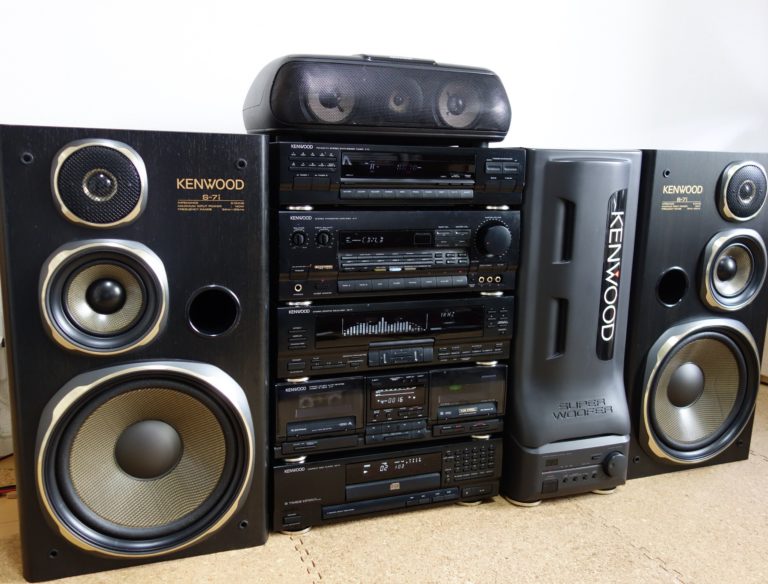
I wrote the firmware for the DP-7J CD player in the Kenwood Roxy G series mini-compo home audio system and possibly the Allora series too. The core of the firmware, like the keyscan, LCD display and laser control were optimised from previous generations of CD players to fit into the 8KB NEC 75X ROM, and I added new features for the computer controlled recording system (CCRS) like the Multi-CD Edit for taping from multiple CDs onto one tape, and Fade Edit, Cross Fade and AI Edit to fit CDs neatly into the A and B sides when dubbing to tape.
You know how challenging it is to shuffle tracks to fit on a tape with only 256 bytes of RAM and a 4bit microcomputer? It took 8 pages in the instruction manual just to explain the functions (p47-53)
A CAD app I wrote in IBM Basic for drawing lines and components for the electronic circuits we designed for my final year project in university.